Showing posts with label modelling. Show all posts

16 June 2015

Week 40: Clint,Caves and Cous Cous

As if it's week 40...

Well first things first - it's almost time to start work on the other project's i'm helping with, and now that i'm so far ahead with my own this is definitely the best time to start!

I'm going to be helping with animation for Ritchie's project - Let's Find Them Together. And I had the exciting pleasure of rig testing Clint the pigeon!!. I'm a massive fan of Annita's rigs and everything she's learnt this year and once my projects over I want to get back to rigging practice and learning coding!


It's a bloody good rig, and it's useful to get to know how to use it, and it's limit's ahead of animation, it's also a great excuse to play with some PG poses....
Happy Clint

Karate Clint

Innocent Clint

Sexy Clint

Smug Clint
I love Clint.
________________________________________

In work related news, with all my cameras set up ad life spiralling, i've decided to remodel my cave - the idea of just have a matte for a wall didn't appease me AND when it comes to lighting, actually having a cave type thing for a lot of the shots will be VERY useful for casting fun shadows.

After months of cave /soul searching, I accidentally stumbled upon some really useful videos for quickly modelling and texturing them - to be honest i'm gutted that I didn't suss this out before. For shame.


Soooo firstly, this is was a complete test to see if I could get it to work and what I would need to change. The UV map being the main thing...


I've kinda cheated it and created a 'UV from Camera' - which will definitely save me time from UV mapping the whole thing - parts that won't even be in shot.


I've completely repainted the cave wall based on some Borderland references... there are still a few colour tweaks to make and I need to work out the tiling, which isn't currently going to plan... but i'll crack it...

Borderlands reference
Minnneee


1 February 2015

Model Behaviour

I've been doing a bit of environment modelling for our Going Live project, and i'm finding it very useful in terms of preparing for modelling my own environment for my personal project.


Also had a stab at modelling plants O_O I'm sure there's a much better way to do it in terms of workflow but i'm quite please with the results!


I'm going to be looking at a few tutorials to make sure I can really nail the planet / space atmosphere. I'll be finalising the design, the assets and modelling next week! Need to make sure it doesn't get left behind.

I've also been working on my Pre Vis - its my firsts one so I looked around online for a few tips, and i've watched the one Amit made for Going Live more than a few times. My main aim was to create something quickly so I could focus more on the key framing.

I looked into creating it in SketchUp (for some reason i thought Maya would take longer....), it's quite a powerful tool and it's starting to be used for Pre-Vis's, but I found it was taking a lot longer - especially re-acquainting myself with it to use for this particular thing.


I don't think I have the time right now to sit and work on it properly, and using Maya will help me achieve the angles I want a lot quicker, and I can make the assets super quick - instead of importing rough one from the SketchUp Warehouse.

Until next time SketchUp

Quickly modelled my terrain and main assets. Also did a quick not very god bind of my character to move around.. I say move very lightly. She is currently eyeless cause they wont move with her body. I'll figure it out.


The cave was a lot tricker and I ended up just using a series of planes... i'll keep finding a way to model this properly. But thinking about my camera angles you don't actually see the outside of the cave... just the inside, so I can probably get around modelling the whole thing =D

LOL - cave madness... looks like a burnt out shack.

16 January 2015

So it's 5am....

And I think that's a perfectly acceptable time to blog and announce that I have FINALLY finished rigging (not including the face or weight painting, but still).


It's been a much longer process than I expected the second time round, but mainly due to the complexities of the rig. I DEFINITELY learnt a lot from this process, and again I feel like I know Maya a little better. But the main WIN from this is that I can now spot issues with the rig and know how to address them / where to look to amend etc. I usually would have had a wtf moment and restart from my last point, but working with the Node, Connection and Script editors has really helped.

26 December 2014

Maya, Modelling and Me

Huzzah! Think i've pretty much finished modelling her now :) It was definitely a much quicker process, but I also wanted to be a bit more careful with my 
topology because I will be animating her.

Also added in teeth and a tongue for when I eventually animate her face!

In terms of texturing I definitely want to go for a more 2D look so may do this with toon shading, but also want to test out different methods like lining over the UV maps.


23 December 2014

Week 15: Re-Modelling Progress

I've spent the last couple of days remodelling my character for my final project.

Definitely working a lot quicker and with more confidence in Maya! - Still have Digital Tutors in the background just in case!

But i'm finding that because she's more stylised this time I have have a bit more fun with her and make certain elements like the waist and hips more extreme without having to worry if she is anatomically correct! It's also making my mesh a lot more simple. I'm trying to make sure i'm not just throwing around edges and cuts like with my last model. And i'm looking out for triangles and 5 sided shapes!

She's also less square and a lot more rounded this time, now that I know what i'm doing.


Aiming to be done in a day or so.

UPDATE 1:

Body base pretty much done. Working on the head and a portrait of Kendrick Lamar to keep my  portrait skills up! (And to keep me de-stressed)


UPDATE 2:

Finally finished up the head pretty much! It's such a MASSIVE difference and improvement from my first attempt, and I had a lot of fun doing it and tryingg out a different technique from before.

This time I used the cube method thanks to Digital Tutors, instead of the plane method that i'd done previously.


18 November 2014

Week 10: The Slowest UV Mapper Alive

SO.... after celebrating actually finishing my model, I forgot that I needed to UV map it =(. My experience of it thus far has been LONG and not as interesting, but needs must

I softened the blow my starting with her helmet first which didn't need mapping as it's glass and transparent! I looked at a few tutorials of how to do this, and decided on using the Maya Blinn texture and Ramp Shader (Reasons and tutorials below)

3D Total Glass Tutorial
A VERY useful tutorial - offered 3 methods of creating glass, and insight intto what needs to happen and why when we're texturing glass (refraction, reflection and transparency). I was a little unsure about what some things were/ did like Ramps so got a bit of info on them too.

Spa Fi Glass Tutorial
Again very useful but it didn't sit quite right for what I wanted.

Lynda Glass Tutorial - mia_material_x
I did like the use of mia_material_x, but it was a bit too realistic for more liking, it reflected on her face like real glass would and made it shiny, which wasn't the effect I wanted for her - glass shiny - Yes, her face shiny - No

Lynda Glass Tutorial - Blinn / Ramp Shader
 I went with this one using the Ramp Shader and added a bit of texture made in Photoshop via a tutorial HERE. So while it's shiny and transparent it doen't make her facce shiny and glassy either which is perfect

Playing around with Glass using Blinn and transparency
Glass using mia_material_x - WHY DOES HER HEAD LOOK LIKE A BOWLING BALL?!
Glass using Ramp Shading - her face isn't shiny! =D

And then there was UV Mapping - like modelling, I am ALSO the slowest UV mapper alive. ALTHOUGH it's ALOT easier than I remember it being and I know i'll get quicker with practice.

Again a learnt a lot about the process and why its important, it's also give me a couple of things to look out for when im next modelling - like how I attach the ear, and the curves of shoulders etc.

I had a bit of trouble at the beginning trying to figure things out but the Lynda
Digital Tutors and
Method J tutorials really were a god send, especially the Digital Tutors one

I also checked out a few non academic (normal people!) ones on Youtube to get a few more tips to help speed up my process:

https://www.youtube.com/watch?v=uPBJBeloki0
https://www.youtube.com/watch?v=r6KCWV4wyoQ
https://www.youtube.com/watch?v=7aBYVA_ekHM

The result? I actually managed to finish it in about 15 hours, and I am VERY happy with it. Will probably try to make my squares a bit smaller, but excited to start texturing in Photoshop and Mudbox.
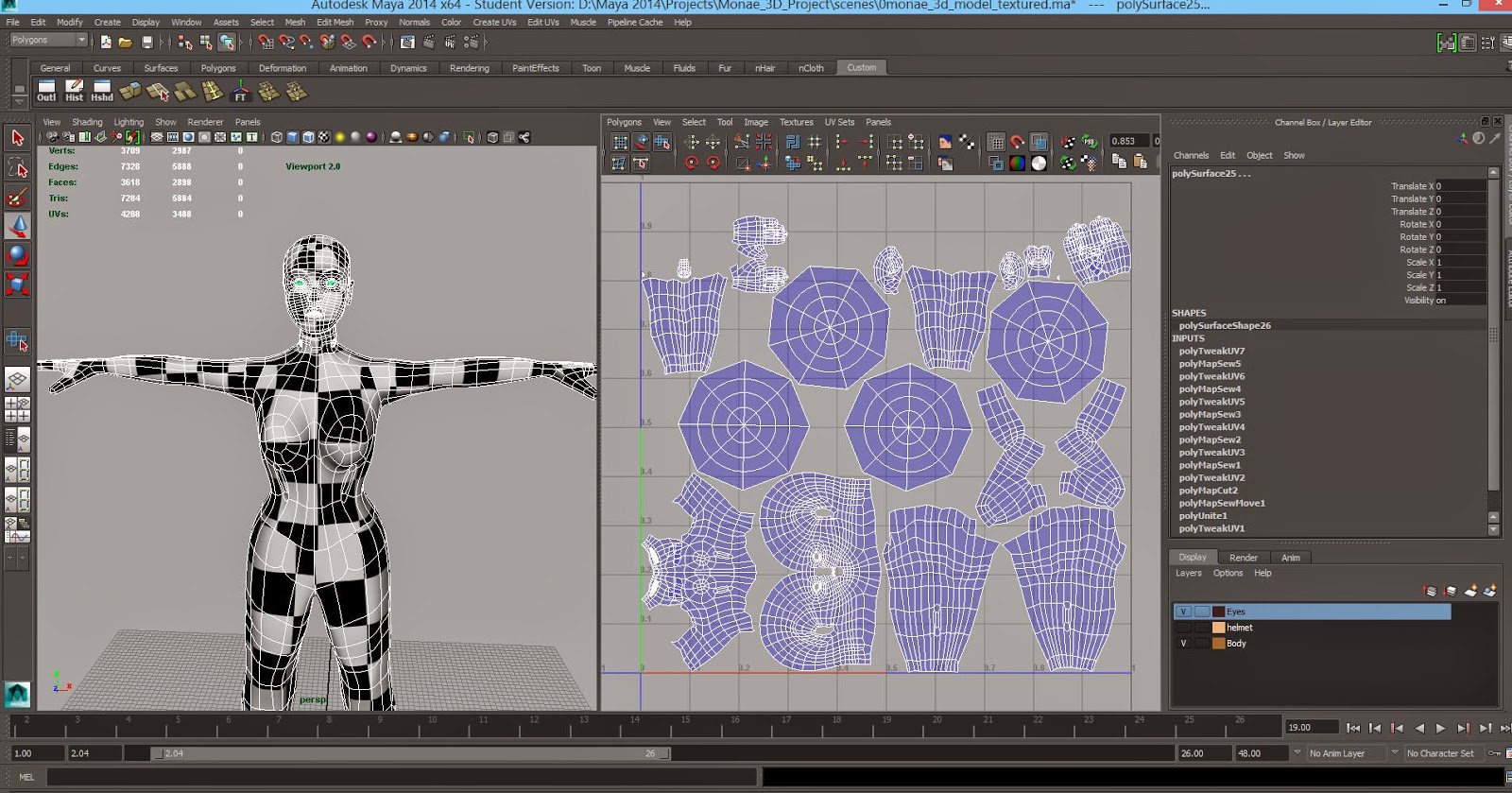
My UVed model.
UV snapshot for 2D painting!!

I think the only really downside of this is that it's REALLY highlighted a potential issue if my project is in 3D - i'm far far FAR to slow, so 2D with some 3D elements is still the front runner for my final project. I think i'll know fully when she's textured and rigged.

UPDATE
So i've been trying to figure out a way to make my checker texture smaller on my model. Scaling my UV maps only made them leave the box, so I found a much simpler way by going into the place2Dtexture and increasing the Repeat UV numbers (i've settled on 25)


Going to double check this with Sean in Friday's lesson to make sure I haven't broken her!